

Square
Orders, catalogue, and payments synced live. Full history on connect.
OAuth · Live sync · History import



Forecast-aware rota, a dedicated staff app, AI advice you can measure, deep analytics from your own till, team and compliance tooling, and one-click integrations. This is the full product, not a highlights reel.
Screenshot pending
Rota Builder
Expected at /images/marketing/rota-builder-screenshot.png
The week grid shows predicted covers and revenue alongside every shift you assign, so you staff against what tonight is likely to look like, not what you hope it will be. Drag roles across kitchen, bar, and floor while labour cost % updates live, colour-coded green, amber, or red against your target.
Gap detection flags real problems: two or more consecutive understaffed hours where you are meaningfully under target. A single thin hour on a quiet Tuesday stays quiet. Nobody gets pinged for noise nobody could fix anyway.
Work in draft until the numbers look right, then publish. Publishing notifies affected staff and creates a real audit trail per shift, so you always know who was scheduled, when it went live, and what changed.
Predicted covers and revenue on the grid
Live labour cost % vs target
Gap detection (2+ consecutive hours)
Draft and publish with staff notification
Per-shift audit trail on publish
Colour-coded cost health
Run a full role taxonomy with versioned pay that never corrupts history, auto-calculated holiday allowance, and till-code linking into analytics. Compliance groundwork flags scheduling risk early without QuantDine pretending to be a certified authority.
Team management
A complete role taxonomy covers Owner, Manager, Head Chef, Chef, Kitchen Porter, Bar, Waiter, Host, Runner, and Supervisor. Assign once and roles flow through rota, labour costs, and permissions without duplicate setup.
Pay rates are versioned, so a rate change never corrupts historical cost data. Holiday allowance is auto-calculated with entitlement, days used, and days remaining, tied to a business-wide reset date you control. Link till codes to staff and their session performance follows them in analytics.
Full role taxonomy (10 roles)
Versioned pay rates
Historical cost data preserved
Holiday entitlement auto-calculated
Used and remaining days
Business-wide reset date
Till-code linking
Compliance groundwork
Advisory flags surface rest break gaps and 48-hour average working week pressure as you build the rota, so owners can adjust before the week goes live. QuantDine helps you stay ahead of scheduling risk. It does not position itself as a certified compliance authority, and it never auto-changes a published rota on your behalf.
Flags sit alongside labour cost health and gap detection, so compliance awareness is part of the same workflow where you already make staffing decisions, not a separate audit you run once a month.
Rest break advisory flags
48-hour week average warnings
Visible while building the rota
Advisory only, never auto-enforced
Not a certified compliance tool
Owner stays in control of publish
Screenshot pending
Staff App
Expected at /images/marketing/staff-app-screenshot.png
The Staff App is a deliberately minimal surface with an entirely separate login from the owner and manager dashboard. A compromised staff account can never see revenue, costs, or business data. That boundary is architectural.
My Shifts shows published rotas only, never drafts. Swap requests open to any same-role colleague to claim, then route to the manager for one-tap approval. Holiday requests follow the same flow. The Today view is zero-financial-data by design: predicted covers, tonight's push item by name only, weather, and their own shift. Install it to a phone home screen like a native app.
Separate login from manager dashboard
Published shifts only
Same-role swap requests
One-tap manager approval
Holiday requests same flow
Today view with no financial data
Installable to home screen
To-do & staff announcements
A lightweight daily and weekly operational checklist lives where managers already work: opening tasks, closing tasks, prep reminders, admin items, all ticked through beside the rota and forecasts. No separate tool that nobody opens on a busy Friday.
Paired with a simple one-way News feed on the Staff App Today view: predicted covers, tonight's push item by name, weather. No group chat, no two-way messaging, no financial data ever surfaced to staff devices.
Opening and closing checklists
Prep and admin reminders
Daily or weekly cadence
One-way News feed on Today view
Covers and push item by name
No chat or financial data
Every morning, a fresh AI demand forecast covers predicted covers, a revenue range, and a stated confidence level, built from your trading history, weather, and local events. The weekly rota summary is written in plain English and grounded strictly in your real numbers.
Advice cards surface specific, actionable recommendations with prediction ranges rather than false precision. Each card tracks against a specific metric over 90 days with checkpoints at day 28, 60, and 90. Contamination detection flags when two tracked cards overlap on the same metric, so you are not double-counting outcomes.
QuantDine Chat lets an owner ask plain-English questions over their own restaurant data and get numbers back, not a report queue. Every AI output states its confidence, never presents thin data as certainty, and stays advisory. A human approves before anything touching pay or scheduling goes live.
Daily covers and revenue forecast
Weather and local events factored in
Weekly rota summary in plain English
Advice cards with prediction ranges
90-day tracking with day 28/60/90 checkpoints
Contamination detection on overlapping cards
QuantDine Chat over your own data
Human approval before changes go live
Today's forecast
High confidenceCovers
142
Revenue
£4.2–4.8k
Labour
31%
Weekly rota summary
Tue lunch is understaffed by one FOH. Sat dinner is overstaffed by 0.5 FTE, so consider trimming the 5pm start.
Add one waiter · Tue lunch
+4–10% coversDay 28 checkpoint: +5.1% · measured over 90 days with YoY seasonality control
QuantDine Chat
“What did we take last Saturday lunch?”
£3,840 · 96 covers · +11% vs same Sat last year
Advisory only. A manager approves before pay or scheduling changes go live.
52-week performance heatmap
Sat = 3.2× Tue weightThis week
£18.2k / £19k
YoY vs target
+6.4%
AI card day 60
On track
Targets & measurement
Day-weighted targets reflect real trading rhythm. Saturday is worth more than Tuesday, not the same arbitrary daily goal. Set targets as a fixed amount, percentage growth on last year, or with monthly seasonal multipliers. A 52-week performance heatmap shows seasonal rhythm at a glance.
Every AI recommendation is measured against a specific metric with year-on-year comparison controlling for seasonality. Closure detection excludes temporary closures from averages, and a 150-day hard cap ensures tracking never runs indefinitely.
Day-weighted targets
Fixed, YoY %, or seasonal multipliers
52-week performance heatmap
Weekly target progress tracking
YoY comparison with seasonality control
Closure detection in averages
150-day measurement hard cap
Everything pulls from your connected POS. No industry benchmarks, no exported spreadsheets. Revenue trends, menu engineering, and waiter performance each get the depth they deserve, because a number on its own rarely tells you what to do next.
Revenue · vs same period last year
+8.2% YoYBest hour
7–8pm
Best session
Sat dinner
Week target
91%
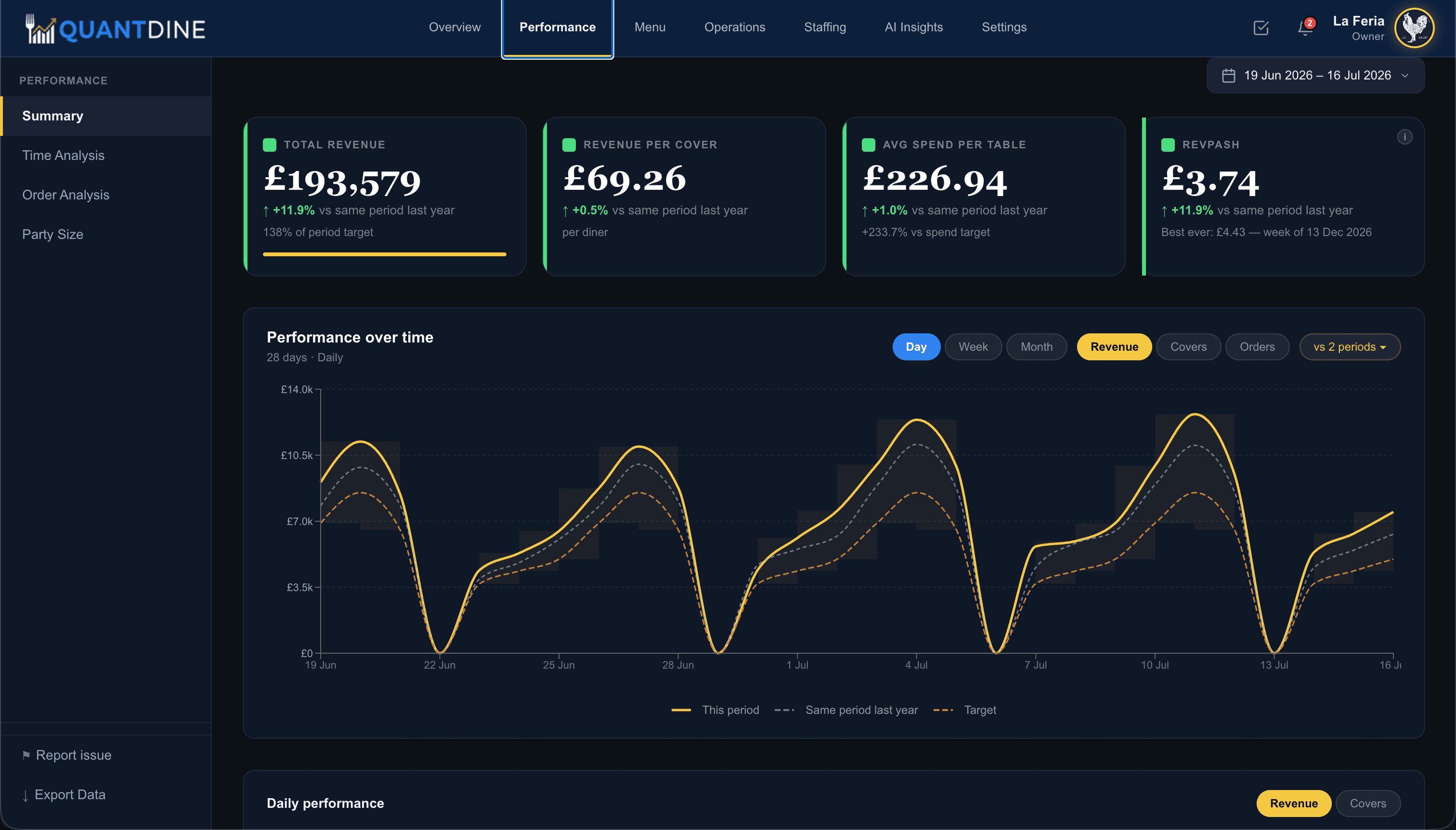
Revenue
Daily, weekly, and seasonal revenue trends from your own POS data, with any period compared against the same period last year, adjusted for day of week so you are not fooled by calendar quirks.
Best hour, best session, and revenue by day of week sit at a glance. Weekly targets show live progress so you know mid-week whether you are on pace, not after the tills are counted on Monday.
Daily to seasonal revenue trends
YoY compare adjusted for day of week
Best hour and best session
Revenue by day of week
Weekly targets with live progress
Your POS data, not benchmarks
Menu
A full menu engineering matrix classifies every item as a star, ploughhorse, puzzle, or dog, so you see margin and popularity together, not in separate reports that never get reconciled.
Course attach rates, food versus drinks split, and weekly movers are tracked automatically. The items that need a price change, a push from the pass, or a quiet retirement stop hiding in aggregate totals.
Stars, ploughhorses, puzzles, dogs matrix
Course attach rates
Food vs drinks split
Weekly movers tracked automatically
Reprice and push signals
Margin drag visibility
Stars
12
items
Ploughhorses
8
items
Puzzles
5
items
Dogs
3
items
Waiter performance · this month
Revenue per session vs trend and same period last year
Operations
Waiter performance by session bands staff into star, strong, standard, and watch tiers, linked through till codes so attribution follows the person on the floor, not a generic shift total.
Revenue per session is tracked against trend and year-on-year, so coaching conversations start from data you already collect, not anecdotes from one bad table on one night.
Performance by session
Star, strong, standard, watch tiers
Till-code linked attribution
Revenue per session vs trend
Year-on-year session comparison
Coaching signals from live data
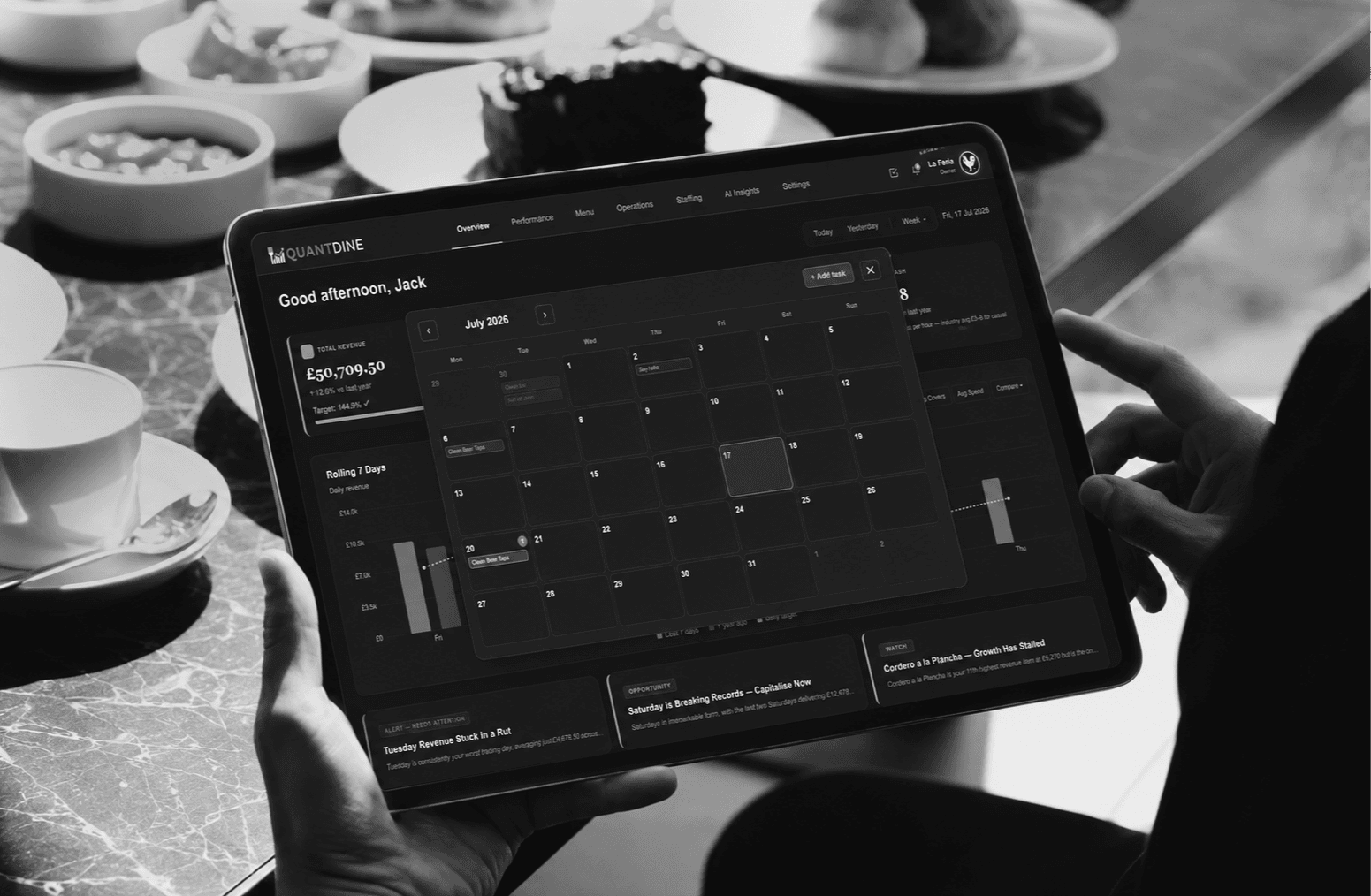
Purpose-built tablets for kitchen and front of house: an 11" standard terminal for day-to-day service, and a 12.7" premium option for owners and managers who want more screen for dashboards and rota. Both ship ready to log in with no consumer tablet setup and no app store hunting.
Learn more about QuantDine TerminalsSquare, HubRise, and Zettle connect with one-click OAuth. Live order and catalogue sync keeps analytics, forecasting, and menu performance current. Historical data imports automatically on setup so you are not starting from a blank slate.
Orders, catalogue, and payments synced live. Full history on connect.
OAuth · Live sync · History import
Aggregator and delivery orders alongside direct sales.
OAuth · Live sync · History import
PayPal Zettle POS on the same one-click OAuth flow.
OAuth · Live sync · History import
Bath's first 10 founding restaurants get free access during the pilot. Apply now, or talk to us if you have questions first.
QuantDine Ltd · Company No. 17146711 · ICO ZC119810 · Security